
Google Business Profile optimization: the free real estate most local businesses waste
Search your own business name on your phone right now.
The box that shows up first, with your hours, your map pin, your photos and a stack of reviews, is your Google Business Profile. For most local service businesses, it’s the single most-looked-at thing they own online. More than the website. More than the social pages. It’s often the first and only impression a ready-to-buy customer gets.
And most owners set it up once, years ago, filled in the address and phone number, and never touched it again.
That’s the gap. Google Business Profile optimization isn’t a box you check once. There’s real depth to it now, and the businesses that use that depth show up first while everyone else fights over the scraps below the map.
Here’s what’s actually in there, and why it’s worth an afternoon of your time.
Why your profile matters more than your website for local search
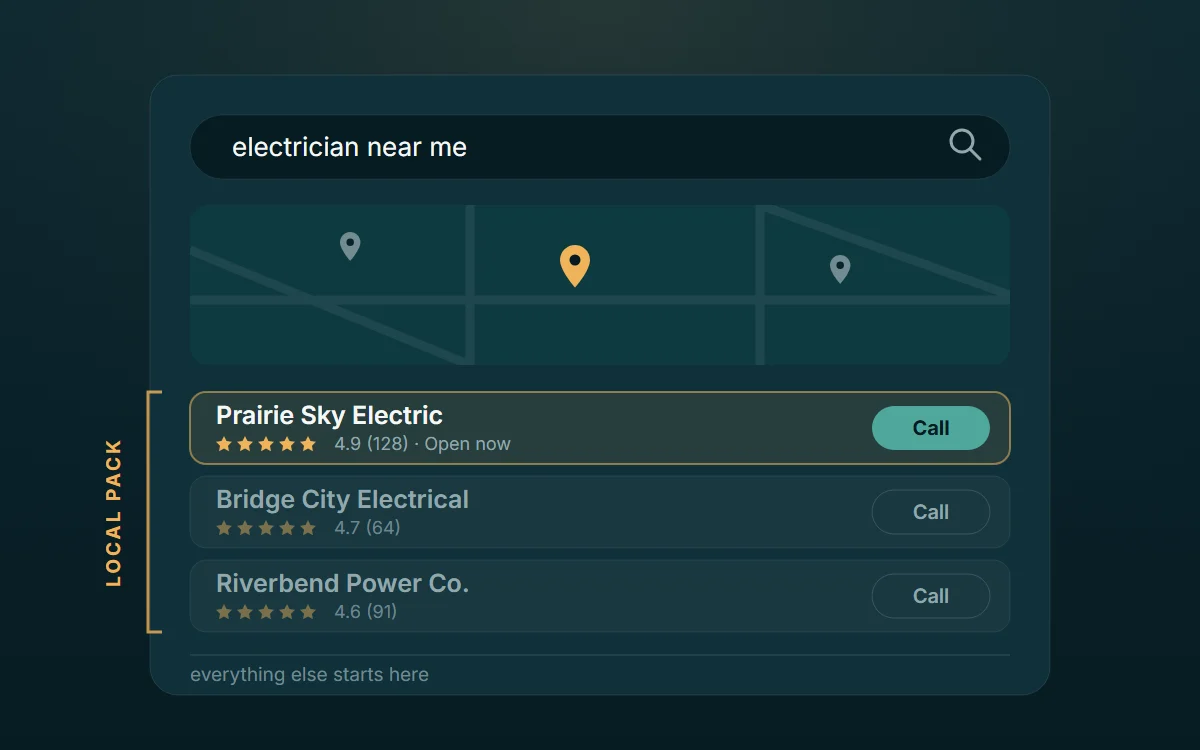
When someone searches “electrician near me” or “physio in Regina,” Google doesn’t lead with ten blue links anymore. It leads with the map and the three businesses in the Local Pack, the top spots right under it. Those three profiles get the clicks, the calls, and the directions taps. Everyone below them is mostly invisible.
You don’t buy your way into that pack. You earn it, largely through how complete, active, and trusted your Business Profile is. So a fully built-out profile isn’t a nice-to-have. It’s how you get found the moment someone’s ready to spend money, without paying for the click.
The basics get you listed. The depth gets you chosen.
The parts most people never fill in
Name, address, phone, hours. That’s where most profiles stop. Here’s what’s sitting unused underneath:
Categories. Your primary category is one of the strongest signals for which searches you show up in. Pick the most specific one that fits, then add secondary categories for the other things you do. A “roofing contractor” who also does gutters and skylights should say so.
Services and products. You can list every service you offer, with descriptions. This tells Google exactly what you do and gives your profile more surfaces to match against searches. Empty here means you’re guessing on visibility.
Photos. Profiles with real, current photos get more clicks and more calls. Not stock images. Your actual crew, your actual work, before-and-afters. Add them regularly, because a profile that’s clearly alive reads as a business that’s clearly open.
The Q&A section. People ask questions right on your profile, and if you don’t answer them, a competitor or a random stranger might. Seed it yourself with the questions you get every day and answer them plainly.
Reviews, and your replies to them. Reviews are a ranking factor and a trust factor at the same time. Reply to all of them, good and bad. A calm, human reply to a rough review often sells better than the five-star ones.
None of this costs anything. It just takes attention most businesses never give it.
The update worth paying attention to: your social posts can now pull double duty
Here’s the part that changed the math recently.
Google lets you link your social media accounts directly to your Business Profile: Facebook, Instagram, LinkedIn, YouTube, TikTok, X and Pinterest. One link per platform. On the surface that looks like a small convenience: a few clickable icons at the bottom of your listing.
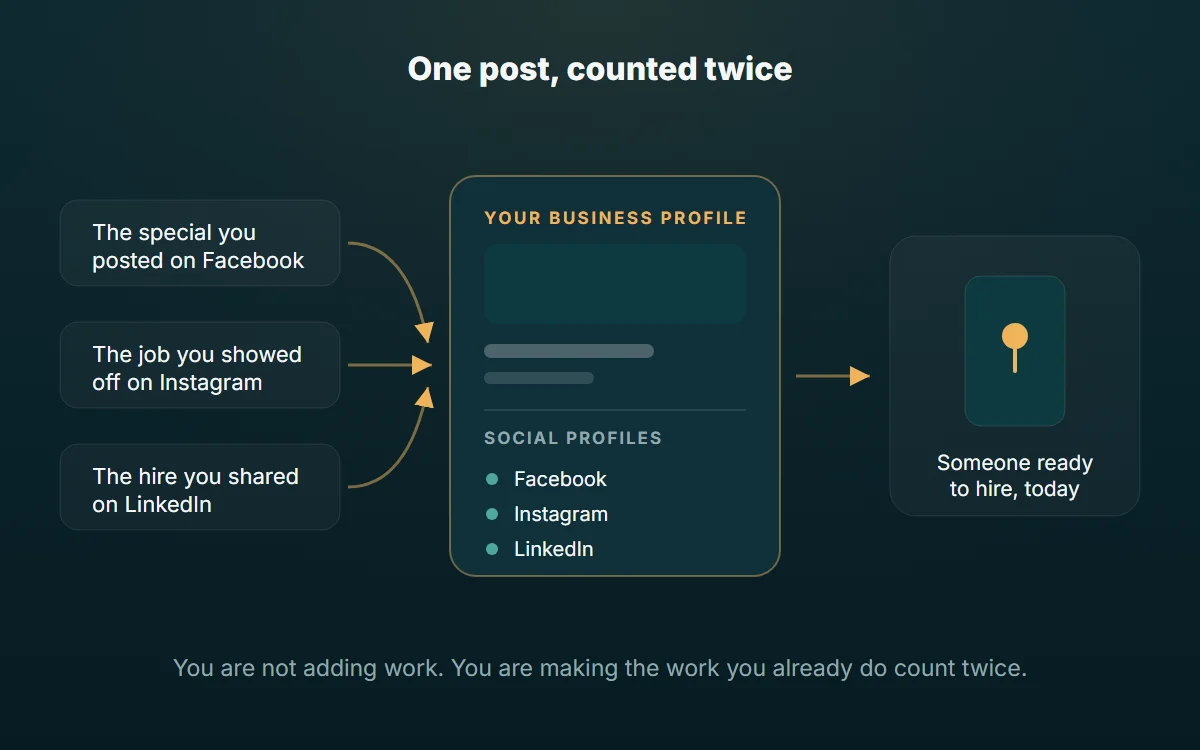
It’s more than that. Google isn’t just displaying those links. It increasingly reads the content on your connected profiles to understand your business. That feeds what it shows, your local visibility and its newer AI search features. And posts you make about events, deals, or offers on those linked accounts can surface right on your Business Profile.
That’s the whole point: the posts you already make can now do more legwork. Take the special you announced on Instagram, or the job you showed off on Facebook. Instead of dying in a feed, that content can feed the profile ready-to-buy customers actually see. You’re not adding work. You’re making the work you already do count in more than one place.
One honest caveat: the social-links feature has rolled out gradually and by region, so it may look slightly different on your profile, or not be there yet. Check for it and set it up the moment it’s available to you.
How to add your social links (takes about two minutes)
- Search your business name on Google to pull up your profile, or open it in the Google Business Profile dashboard.
- Click Edit profile, then Business information, then Contact.
- Find the Social profiles section and click to add.
- Choose a platform from the dropdown and paste the full URL to that account.
- Repeat for each platform, then save.
Use your most active account for each platform. A linked profile that’s dead sends the wrong signal, so only connect the ones you actually keep alive.
Keep it warm: post like the profile is a channel, not a directory listing
Your Business Profile has its own posts feature, separate from social. Use it. Share offers, updates, new services, seasonal reminders. These posts show up on your profile and quietly tell Google you’re active. That’s what it looks for when it decides who to trust in the Local Pack.
A profile that gets a fresh post every week or two beats an identical competitor who set theirs up in 2019 and walked away. Consistency is the edge here, and almost nobody bothers with it. That’s good news for you.
What this actually gets you
Do all of this and you’re not “doing SEO” in some abstract sense. You’re doing one specific, valuable thing. You show up first, in the map, the moment someone in your area is ready to hire. And you get picked once you’re there, because your profile looks alive, proven and easy to contact.
That’s free traffic that competitors are paying for with ads. It’s the most valuable hour of marketing most local businesses never spend.
Maybe the profile is dialed in and you’re getting found, but the calls still aren’t coming. That’s a different problem, a conversion problem, and it usually lives on your website. We break that one down here.
What it costs to leave it alone
Spend the afternoon and the upside is concrete. You turn up in the map for the searches that happen when somebody is ready to hire. And you stop paying for clicks to reach people who were going to find you anyway.
Leave it and the loss is quiet, which is what makes it dangerous. Nobody sends you an email saying they picked the electrician above you because that profile had photos from this year and yours had one from 2019. You do not see those jobs. You just have a slower month and no explanation for it.
The bit most owners miss is that this work also takes pain away. A complete profile answers the questions that eat your afternoons on the phone before anyone dials: your hours, your service area, whether you do that one specific thing. Fewer tire-kickers, better calls.
And the honest version of doing nothing: you will still get found. People who already know your name will still search it and still reach you. You just miss every “near me” search from someone who has not heard of you yet, which is the entire pool of customers you do not have.
Want a second set of eyes on yours?
Send us your business name and we’ll do a quick teardown of your Google Business Profile: what’s strong, what’s missing, and the three things we’d fix first. No pitch, no pressure. Just a straight read on where you stand.
Want results like these?
Book a free Growth Session. We go through your website, ads and search presence and give you three things to fix, whether you hire us or not.